

Up until recently my only experience with Terraform Stacks has been through testing, experimenting, and simply learning about what it is. There are limits to what you find out when you just play with a technology. Once you start using it in a production scenario you discover the real issues with the technology.
During the past few weeks I have spent time preparing to use Terraform Stacks in a live production scenario. However, a few issues has come up that makes me hesitant to flip the switch to actually use them. In this blog post I will outline two of these. One is a serious bug that I have reported which makes them almost unusable, and the other is just an annoying limitation.
Issue 1: What Plan?#
Stack component configurations are great. You can build a partial stack consisting of component blocks (along with provider blocks, variable blocks, and anything else that goes into your .tfcomponent.hcl files) but no deployment blocks (i.e. no .tfdeploy.hcl files), and you can publish this to your private registry as a stack component configuration or SCC for short.
I have used SCCs to publish what I call baselines for different platforms. One such baseline is for HCP Terraform. This baseline contains a number of resources a team might need to work effectively in HCP Terraform (e.g. a project, credential variable sets, policy sets, initial workspaces, a team, team token, and more). This allows me to combine different baselines together using stack blocks in a consuming Terraform Stack:
stack "hcp_terraform" {
  source  = "app.terraform.io/myorg/hcp-terraform-baseline"
  version = "1.0.0"

  inputs = {
    # ...
  }
}

stack "aws_basline" {
  source  = "app.terraform.io/myorg/aws-baseline"
  version = "1.0.0"

  inputs = {
    # ...
  }
}
You can combine stack blocks with further component blocks and publish these as other SCCs, allowing you to build a hierarchy of abstractions. I wrote a small blog post about this recently.

I like how you can build these baselines and keep them versioned in your private registry.
So, what is the downside of SCCs? It turns out there is a bug when you use SCCs. Allow me to outline how this bug manifests itself.
I have published a Terraform module for managing a random integer (obviously this is a silly example, but it is enough to show the bug). The full source code of this module looks like this:
# main.tf
terraform {
  required_providers {
    random = {
      source  = "hashicorp/random"
      version = "~> 3.7"
    }
  }
}

variable "min" {
  type = number
}

variable "max" {
  type = number
}

resource "random_integer" "this" {
  min = var.min
  max = var.max
}
I can consume this Terraform module in a component block of a Terraform Stack and I can create a deployment that provision resources:
# components.tfcomponent.hcl
component "random_integer" {
  source  = "app.terraform.io/myorg/integer/random"
  version = "1.0.0"

  inputs = {
    min = var.min
    max = var.max
  }

  providers = {
    random = provider.random.this
  }
}

# deployments.tfdeploy.hcl
deployment "dummy" {
  inputs = {
    min = 1
    max = 10
  }
}
If I go through the steps to complete this Terraform Stack with all the necessary details and I create the stack resource itself and run a first plan operation I see this:
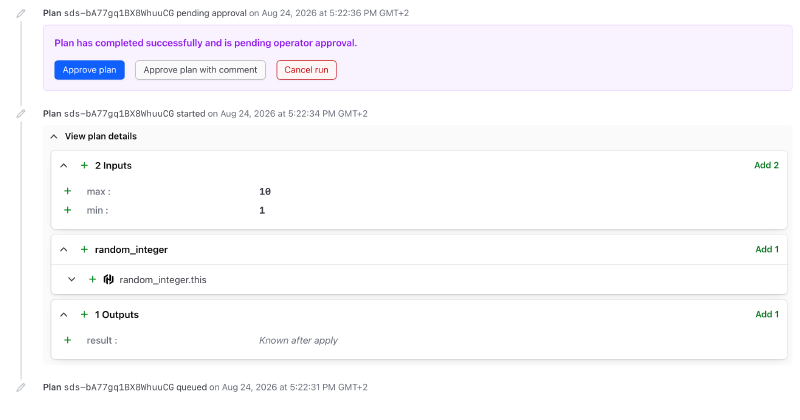
See anything unusual? Me neither. This works as intended! However, let’s now introduce an intermediary SCC. I create a new SCC where I add the same component as in my stack above:
# components.tfcomponent.hcl
component "random_integer" {
  source  = "app.terraform.io/myorg/integer/random"
  version = "1.0.0"

  inputs = {
    min = var.min
    max = var.max
  }

  providers = {
    random = provider.random.this
  }
}
I publish this SCC to my private registry and in my consuming stack I reference it using a stack block:
stack "random_integer" {
  source  = "app.terraform.io/myorg/random-integer-stack-component"
  version = "1.0.0"

  inputs = {
    max = var.max
    min = var.min
  }
}
I go through the same steps to set up a working stack and run a first plan. What do I see?
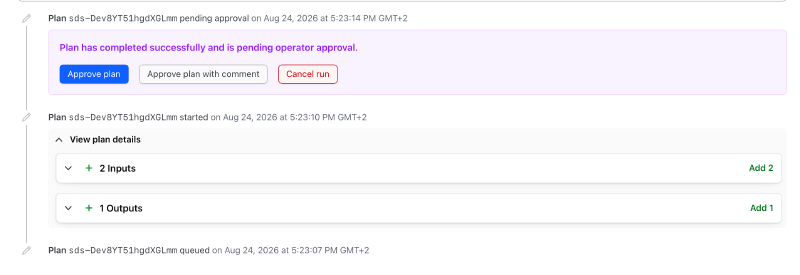
This time I do see something unusual. The plan obviously forgot to tell me anything about which resources will be created, updated or deleted. And as far as I have been able to tell there is no other way at this point to see the plan content. You are operating in complete darkness here. Spin the chamber and click on approve!
Issue 2: Don’t Bend the Rules of Stacks#
Go to the Terraform documentation and read about the use cases for stacks.
I don’t think the documentation explicitly says your deployments must be identical (identical in the sense of being based on the same components), but if they are not you will encounter a specific error I will show you.
Let’s create a new stack with the following components.tfcomponent.hcl file contents:
variable "pairs_of_limits" {
  type = map(object({
    min = number
    max = number
  }))
}

component "lucky_number" {
  for_each = var.pairs_of_limits

  source = "./modules/lucky-number"

  providers = {
    random = provider.random.default
  }

  inputs = {
    limits = each.value
  }
}
In this case I have a map variable that I use in a for_each expression in the component block. This is something you easily would do with modules without thinking twice about it.
Let’s now add a few deployments in deployments.tfdeploy.hcl:
deployment "first" {
  inputs = {
    pairs_of_limits = {
      alpha = {
        min = 1
        max = 100
      }

      beta = {
        min = 100
        max = 1000
      }
    }
  }
}

deployment "second" {
  inputs = {
    pairs_of_limits = {
      alpha = {
        min = 10
        max = 1000
      }

      beta = {
        min = 300
        max = 400
      }
    }
  }
}
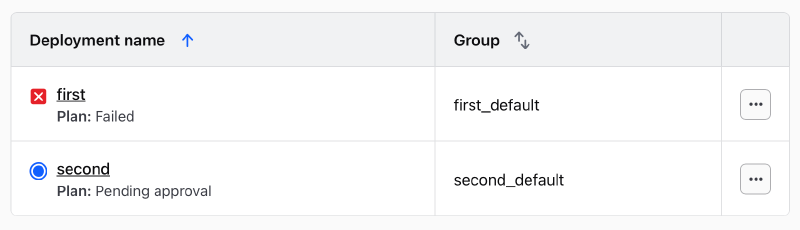
My uneducated understanding here is that the above code should be fine. In a sense it is because I can provision these two deployments with no errors:
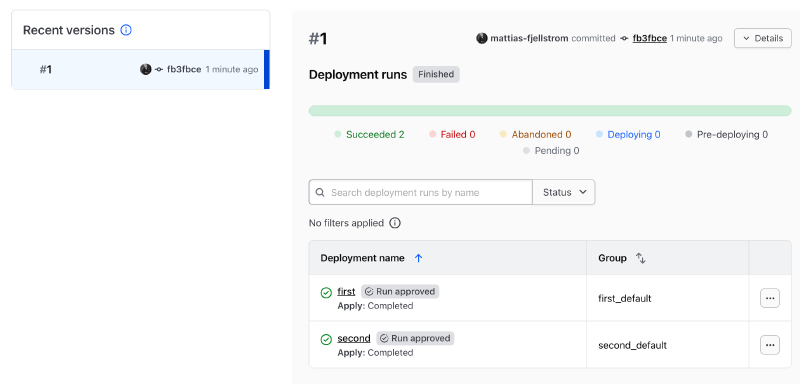
At this point each of the deployments have their own state file living in isolation.
The issues appear when you want to modify one of the deployments. Imagine we delete the beta key from the input map to the second deployment:
deployment "first" {
  inputs = {
    pairs_of_limits = {
      alpha = {
        min = 1
        max = 100
      }

      beta = {
        min = 100
        max = 1000
      }
    }
  }
}

deployment "second" {
  inputs = {
    pairs_of_limits = {
      alpha = {
        min = 10
        max = 1000
      }
    }
  }
}
Applying this configuration gives you an error in the second deployment:
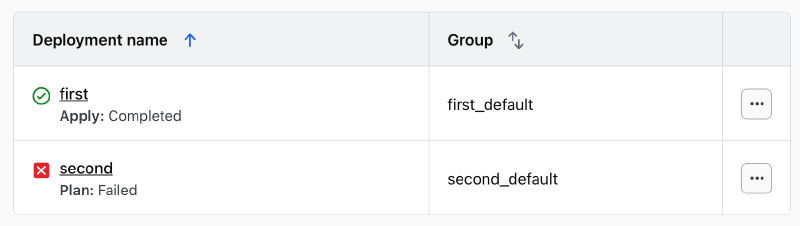
Error: Unclaimed component instance
Error: The component instance component.lucky_number["beta"] is not
claimed by any component or removed block in the configuration.
Make sure it is instantiated by a component block, or targeted for
removal by a removed block.
Apparently the stack does not simply delete the component instance represented by the beta key for the second deployment. Instinctively you try to add a removed block as the error message suggested:
# components.tfcomponent.hcl
# ...
removed {
  from   = component.lucky_number["beta"]
  source = "./modules/lucky-number"

  providers = {
    random = provider.random.default
  }
}
Note that this block must go in your .tfcomponent.hcl files, the .tfdeploy.hcl file has no corresponding block.
You can immediately guess that this will not work. Applying the change reverses the situation from before (I intentionally do not approve the second deployment here):
Error: Cannot remove component instance
Error: The component instance component.lucky_number["beta"] is
targeted by a component block and cannot be removed. The relevant
component is defined at components.tfcomponent.hcl line 15
It is clear that your deployments have separate state files, but their lifecycles are intimately connected through your components because of the shared input keys.
Is there a way to manipulate the state of a given deployment in this situation? I don’t think so.
I believe this issue stems from the fact that I am trying to use Terraform Stacks for something that it was not intended to be used for. The use case page talks about situations where you have multiple copies of the same infrastructure you want to provision across different cloud regions or in multiple different environments (dev, stage, prod).
What I tried to do in this example is to provision different infrastructure in my deployments. OK to be fair this example did provision the same infrastructure to start with, but you can imagine that the inputs to the different deployments can be completely different.
One solution to try is to simply avoid using identical keys in the inputs to the different deployments. So this would work as intended:
deployment "first" {
  inputs = {
    pairs_of_limits = {
      alpha = {
        min = 1
        max = 100
      }

      beta = {
        min = 100
        max = 1000
      }
    }
  }
}

deployment "second" {
  inputs = {
    pairs_of_limits = {
      gamma = {
        min = 10
        max = 1000
      }

      delta = {
        min = 300
        max = 400
      }
    }
  }
}
You still have to add a removed block anytime you remove one of the keys from one of the deployments. Terraform Stacks does not work as normal Terraform modules.
Final Thoughts#
Are Terraform Stacks good, bad or ugly? I would say it is a little bit of all worlds. A few thoughts:
- Good: (1) they simplify provisioning orchestration through deferred changes, (2) SCCs are awesome, (3) managing Terraform declaratively is great
- Bad: (1) I think the run interface gives you too little insight into what is actually going on, (2) Stacks do not support all features that workspaces do, such as policies, tags, etc (3) once you go stacks you are probably stuck because migrating off of stacks is likely non-trivial
- Ugly: (1) SSCs do not report any resource changes, that is a direct blocker for production use cases (2) deployment state is implicitly connected as in my example above