In this blog post I will cover what it takes to set up automated drift detection and scheduled reconciliation in Spacelift. Before that I will cover the origin and background of resource drift to set the stage.
This post will focus on the Spacelift platform from the perspective of an organization working with Microsoft Azure as their target cloud platform of choice. Along the way you will also learn about configuring a private worker pool on Spacelift.
The what and why of Spacelift#
Historically this blog has primarily covered Terraform and the HCP Terraform platform, but this will not be the case in this post.
Spacelift is an infrastructure automation platform similar to HCP Terraform, but with a bigger scope. On Spacelift you can manage infrastructure as code using Terraform, OpenTofu, AWS CloudFormation, Kubernetes, Ansible, Pulumi and Terragrunt. There are many other technical differences that will be apparent in this blog post and future blog posts following this one.
In collaboration with Spacelift I will be covering content around this exciting platform. Spacelift has graciously given me a trial enterprise plan that allows me to evaluate the features covered in this blog post.
I will inevitably be comparing Spacelift with HCP Terraform, because this is how you can really tell if something is better or worse. I am in a very good position to do this because I have used HCP Terraform extensively for a few years so I know what works well, and what doesn’t work well, on HCP Terraform.
As part of covering Spacelift I will also be using OpenTofu instead of Terraform. One big reason for this is of course that the latest available version of Terraform on Spacelift is 1.5.x (and Terraform 1.16.3 is the latest at the time of writing). However, in this blog post there will essentially be no difference in behavior at all. All the example code is the same if you run OpenTofu or Terraform, and all examples are compatible with Terraform 1.5.x.
As most are probably aware, HashiCorp has been acquired by IBM. Likewise, the HashiCorp Ambassadors program was “acquired” by the IBM Champions program in the early months of 2026. I would be lying if I said this change was welcomed. For me personally I believe this is a good reason to widen my technology interests beyond the HCP Terraform platform. This is where Spacelift fits in.
The origin of resource drift#
I like the definition of drift from the Spacelift documentation:
In infrastructure-as-code, the concept of drift represents the difference between the desired state and the actual state of the infrastructure managed by your tool of choice: Terraform, […], etc. In practice, there are two sources of drift: changes introduced by external actors, and dependencies on external data sources."
Your OpenTofu configuration represents your desired state. Once you have provisioned the infrastructure described in your HCL code it exists in an actual state. The actual state is what is reported when you ask your target provider to describe your resources (e.g. using an API GET request).
For OpenTofu there is technically one more component to take into account: the last applied state recorded by OpenTofu. This is what is recorded in the state file. Ideally your desired state, the recorded state, and the actual state all agree.
After you update your desired state (e.g. changing an attribute of a resource in code) but before you apply the change you have drift. Your desired state and the actual state no longer agree with each other. This type of drift is harmless because you have made an explicit change that you intend to apply through your automation workflows.
The type of drift that is usually considered harmful is when your actual state is modified without first being implemented as a HCL code change. This type of drift is what the Spacelift documentation refers to as changes introduced by external actors and dependencies on external data sources:
- An external actor is some other process that makes changes to your infrastructure outside of your HCL code. Usually this is a human making manual changes through a UI or using a script, but it could be an automated process with no human involvement (e.g. an autoscaling rule triggered by high CPU load).
- A dependency on external data sources is when you use a data source block in HCL that reads data that could change at any time. One example is a data source reporting IP CIDR ranges for GitHub Actions managed runners. If GitHub updates this list it will result in drift.
Drift is not necessarily bad, sometimes you want to incorporate the detected drift into your infrastructure. Drift is simply the presence of a difference between desired state and actual state. It is up to you to make the judgement if the detected drift is good or bad.
Why drift detection is important#
Ask 100 infrastructure engineers if drift detection is important and you will likely get roughly a 50/50 split between yes and no.
My take is that drift detection is important. When I’m using OpenTofu to provision and manage my cloud infrastructure I want to be sure that any change to my infrastructure passes through my intended workflow (e.g. through my Spacelift stack).
One could argue that drift is not important because it would be reconciled on the next apply operation anyway. But if you are unlucky the apply operation could fail due to the presence of drift in combination with the change you are applying.
If something has introduced drift in my environment I want to know about it so that I can track it down and judge if this was intentional and wanted. If it was unintentional and unwanted I want to come up with a plan to prevent it from happening again.
Set up automated drift detection and scheduled reconciliation in Spacelift#
In the following walkthrough I will set up automated drift detection and scheduled reconciliation for an example workload with infrastructure on Microsoft Azure.
The heavy-lifting to set this up is typically performed by a platform team, and we will follow the required steps in the coming sections. Primarily we will focus on how to set up a private worker pool for your Spacelift organization, because this is a requirement to enable drift detection and scheduled reconciliation for your stacks.
Note that private workers are only supported for the Starter+ plan or higher and your plan limits how many private workers you can use.
Configure OIDC workload identity federation with Microsoft Azure#
To authenticate my stacks on Spacelift to Azure I will configure workload identity federation using OIDC with an Entra ID (Azure AD) application.
I’ve previously covered how to set this up for HCP Terraform and GitHub in great detail, and the steps are similar for Spacelift.

However, there is a limitation with the flexible federated identity credential feature on Microsoft Azure that prohibits their use for Spacelift. Flexible federated identity credentials are still a preview feature and they only support HCP Terraform, GitLab and GitHub.
Instead I will configure normal federated identity credentials. The following OpenTofu configuration use the AzureRM and the AzureAD providers to configure this (some details are left out for brevity):
resource "azuread_application_registration" "spacelift" {
  display_name = "spacelift"
}

resource "azuread_service_principal" "spacelift" {
  client_id = azuread_application_registration.spacelift.client_id
}

locals {
  federated_credentials = {
    for pair in setproduct(var.run_types, var.scopes) :
    "${lower(pair[0])}-${pair[1]}" => "space:${var.space_id}:stack:${var.stack_id}:run_type:${pair[0]}:scope:${pair[1]}"
  }
}

resource "azuread_application_federated_identity_credential" "spacelift" {
  for_each = local.federated_credentials

  application_id = azuread_application_registration.spacelift.id
  display_name   = "spacelift-${var.stack_id}-${each.key}"
  issuer         = "https://${var.spacelift_hostname}"
  audiences      = [var.spacelift_hostname]
  subject        = each.value
}
I set up a number of federated credentials (see the federated_credentials local value), each with its own subject value. An application can support up to 20 federated identity credentials. For this reason you should configure a dedicated application for each Spacelift stack that provisions infrastructure to Azure.
Apart from the space_id and stack_id variables which are plain strings, add the following two variables for run types and scopes:
variable "run_types" {
  type    = set(string)
  default = ["PROPOSED", "TRACKED", "TASK", "DESTROY", "TESTING"]
}

variable "scopes" {
  type    = set(string)
  default = ["read", "write"]
}
You can adjust the values of these two variables to limit which types of stack runs to support.
Once the application is created for a given space and stack you must configure environment variables for the stack. Either add these directly to the stack or as part of a context available to the stack. Set the following environment variables:
ARM_CLIENT_IDto the client ID of the Entra ID application.ARM_TENANT_IDto your Entra ID tenant ID.ARM_SUBSCRIPTION_IDto the subscription ID where you want to provision resources.
Configure a private worker pool#
The Spacelift documentation lays out the general details of how to configure a private worker pool. In this section I will cover how to set up a private worker pool on Azure Kubernetes Service (AKS).
I will configure everything using OpenTofu. An alternative is to use a combination of OpenTofu for Azure infrastructure and kubectl/helm when interacting with the AKS cluster. I also want to mention that there is an auto-registration workflow (see the documentation) that is a better option if you intend to set up multiple worker pools.
Be aware that due to complex dependencies you will not be able to create the full infrastructure using a single stack and a single apply operation. Essentially you must do this in three steps (e.g. using three chained stacks):
In the rest of this section I cover the required resources, and you are free to provision them in a way that best suits your needs.
I first create a new space called “platform” where I will create my private worker pool:
resource "spacelift_space" "platform" {
  name            = "platform"
  parent_space_id = "root"
  description     = "Spacelift platform management space"
}
When you create a private worker pool you must first create a private key and a certificate signing request (CSR). This is used to ensure that only workers from a given pool can access temporary run state processed by this pool. You could use your existing private key infrastructure (PKI) to create these items, or you can use the TLS provider and create then using OpenTofu:
resource "tls_private_key" "worker_pool" {
  algorithm = "RSA"
  rsa_bits  = 4096
}

resource "tls_cert_request" "worker_pool" {
  private_key_pem = tls_private_key.worker_pool.private_key_pem

  subject {
    common_name  = "your-common-name.com"
    organization = "your-organization"
  }
}
Note that if you use this approach the private key is stored in your state file.
Next configure the private worker pool resource:
resource "spacelift_worker_pool" "aks" {
  name        = "aks-private-workers"
  space_id    = spacelift_space.platform.id
  description = "Private worker pool on AKS"
  csr         = base64encode(tls_cert_request.worker_pool.cert_request_pem)
}
I didn’t configure the drift_detection_run_limit attribute for my worker pool, but if you have a large number of stacks that will use drift detection you should configure a limit to avoid all the workers to be constantly queued up for drift detection.
An important output attribute from the spacelift_worker_pool resource is config. This attribute contains a signed certificate generated from the CSR and other important configuration.
Now I need to configure the AKS infrastructure for my private workers. I configure a standard AKS cluster using the Azure provider:
resource "azurerm_kubernetes_cluster" "this" {
  name                = "aks-spacelift-workers"
  location            = "swedencentral"
  resource_group_name = "rg-spacelift-workers"
  dns_prefix          = "aks-spacelift-workers"

  default_node_pool {
    name       = "default"
    node_count = 2
    vm_size    = "Standard_D2s_v3"
  }

  identity {
    type = "SystemAssigned"
  }

  network_profile {
    network_plugin = "azure"
    network_policy = "azure"
  }
}
To tell my Spacelift stack to use the OIDC workload federation authentication I configure my Azure provider like this:
provider "azurerm" {
  features {}
  use_oidc             = true
  oidc_token_file_path = "/mnt/workspace/spacelift.oidc"
}
At this point you must provision the AKS cluster before you can continue with the next step.
Spacelift provides a Kubernetes operator for managing your worker pools and a custom resource definition (CRD) for WorkerPool resources. You can install these using the spacelift-workerpool-controller Helm chart either through the Helm CLI or using the Helm provider with OpenTofu:
resource "helm_release" "workerpool_controller" {
  name             = "spacelift-workerpool-controller"
  repository       = "https://downloads.spacelift.io/helm"
  chart            = "spacelift-workerpool-controller"
  namespace        = "spacelift-worker-controller-system"
  create_namespace = true
  wait             = true
}
Authenticate the Helm provider using authentication details from your AKS cluster:
provider "helm" {
  kubernetes {
    host                   = "your-aks-cluster-host"
    cluster_ca_certificate = base64decode("aks-cluster-ca-certificate")
    client_certificate     = base64decode("aks-cluster-client-certificate")
    client_key             = base64decode("aks-cluster-client-key")
  }
}
Once the Helm release is installed you can create a new Kubernetes namespace for your private workers along with a Kubernetes secret containing the private key we configured before and the config attribute from the spacelift_worker_pool resource:
resource "kubernetes_namespace_v1" "workers" {
  metadata {
    name = "spacelift-workers"
  }
}

resource "kubernetes_secret_v1" "worker_pool_credentials" {
  metadata {
    name      = "aks-private-workers-credentials"
    namespace = kubernetes_namespace_v1.workers.metadata[0].name
  }

  type = "Opaque"

  data = {
    token      = spacelift_worker_pool.aks.config
    privateKey = base64encode(tls_private_key.worker_pool.private_key_pem)
  }
}
Finally, create a WorkerPool resource in the same namespace that uses the secret you configured above:
resource "kubernetes_manifest" "worker_pool" {
  computed_fields = ["metadata.annotations", "metadata.labels", "metadata.finalizers"]

  manifest = {
    apiVersion = "workers.spacelift.io/v1beta1"
    kind       = "WorkerPool"
    metadata = {
      name      = "aks-private-workers"
      namespace = kubernetes_namespace_v1.workers.metadata[0].name
    }
    spec = {
      poolSize = 2
      token = {
        secretKeyRef = {
          name = kubernetes_secret_v1.worker_pool_credentials.metadata[0].name
          key  = "token"
        }
      }
      privateKey = {
        secretKeyRef = {
          name = kubernetes_secret_v1.worker_pool_credentials.metadata[0].name
          key  = "privateKey"
        }
      }
    }
  }
}
I configure my worker pool to contain 2 workers. Consider how many private workers your pricing plan supports and how many worker pools you plan to use before you set this value.
Once everything is provisioned and ready you can see your private worker pool on Spacelift:
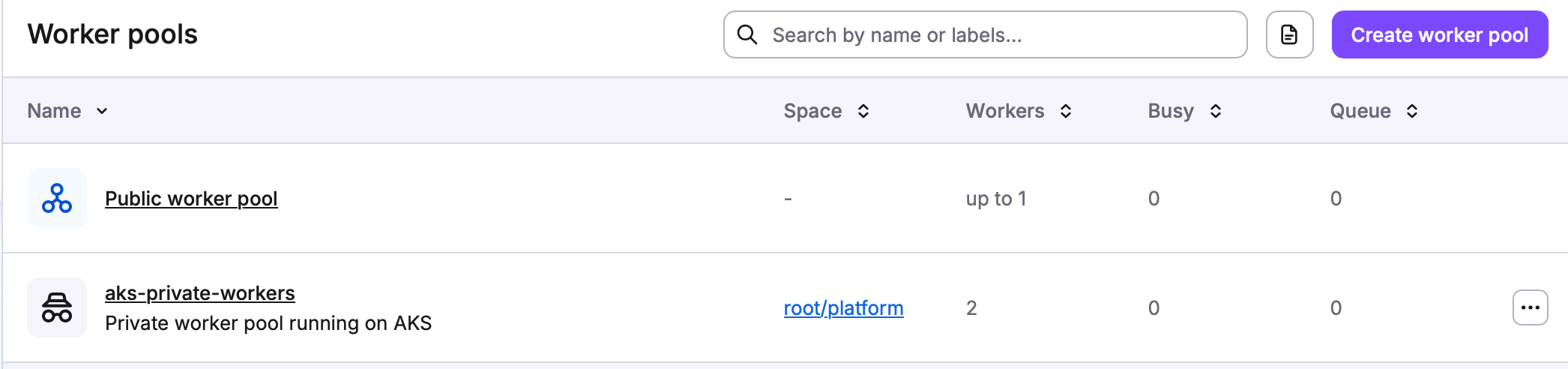
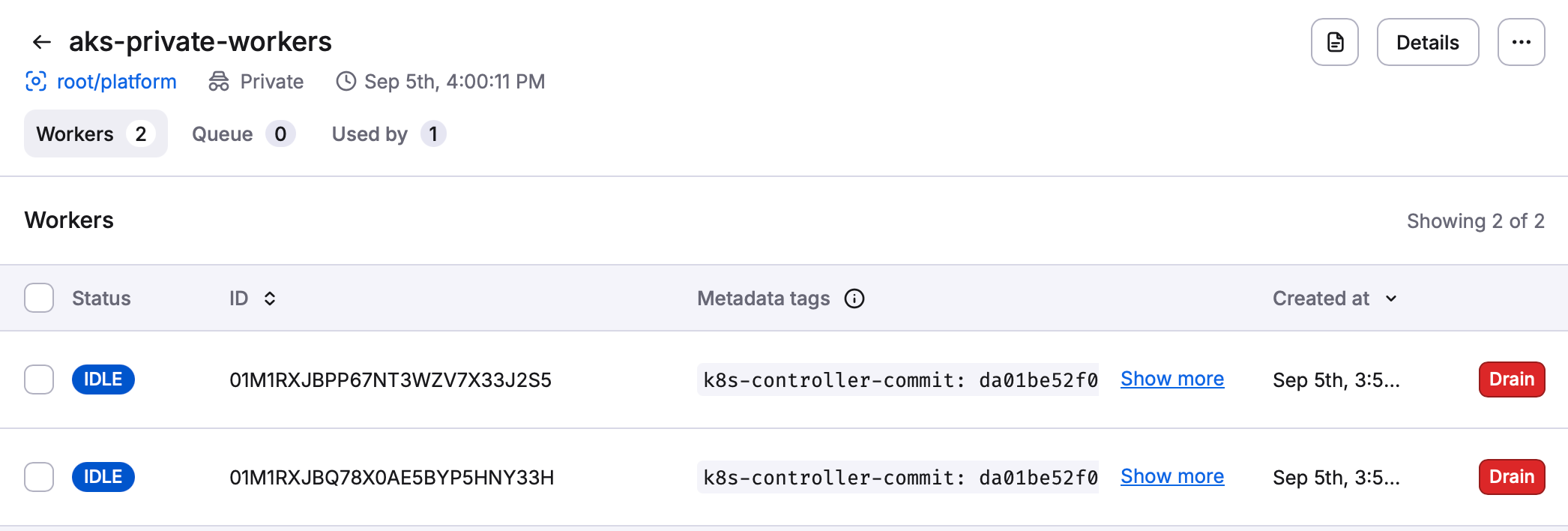
Entering the private worker pool shows you all workers and you can perform actions such as draining a worker if required:
Configure drift detection for a workload stack#
All prerequisites are in place and it’s time to configure a workload stack and enable automated drift detection and scheduled reconciliation.
I create a new space named “workloads” as a child space to the platform space I created earlier:
resource "spacelift_space" "workloads" {
  name             = "workloads"
  parent_space_id  = spacelift_space.platform.id
  description      = "Space for Azure workloads"
  inherit_entities = true
}
I specify that this space should inherit entities from the parent space, this includes the private worker pool. Next I configure a workload stack in this new space:
resource "spacelift_stack" "workload" {
  name                    = "workload"
  description             = "An example workload on Azure"
  space_id                = spacelift_space.workloads.id
  repository              = "my-repository-name"
  branch                  = "main"
  project_root            = "my-iac-directory"
  worker_pool_id          = spacelift_worker_pool.aks.id
  autodeploy              = true
  terraform_workflow_tool = "OPEN_TOFU"
}
There are two important arguments added to this workload stack resource:
worker_pool_id = spacelift_worker_pool.aks.idconfigures this stack to use the worker pool we configured earlier. If you do not specify this the public worker pool will be used instead.autodeploy = trueis required if you want to fully automate drift reconciliation. If you leave this configuration asfalseyou will have to manually approve the run before reconciliation takes place.
Finally, I configure automated drift detection and scheduled reconciliation:
resource "spacelift_drift_detection" "workload" {
  stack_id     = spacelift_stack.workload.id
  schedule     = ["0 */3 * * *"]
  reconcile    = true
  ignore_state = true
}
Note the following:
- The
scheduleargument configures one or more cron expressions for when drift detection should run. In this example there is one schedule added that runs drift detection every third hour on the hour. - The
reconcile = trueargument enables reconciliation. ignore_state = truemeans that drift detection should run no matter what state the stack is in. If you leave this argument asfalsedrift detection will only run if the stack is in the “Finished” state.
Drift detection in the Spacelift portal#
You can visually tell that drift detection is enabled for a stack in your list of stacks in the “Settings” column:

Once drift detection is triggered and drift is detected this is visually apparent in the “Issues” column in the list of stacks:

From the list of runs for a given stack you can also tell if the run was triggered to reconcile detected drift:

Comparison to alternatives#
Automated drift detection and scheduled reconciliation on Spacelift works really well. It allows you to specify how often this should run, and allows you to reconcile detected drift. But we should compare this to how it works on other platforms to understand the strengths and possible weaknesses.
Roll your own resource drift#
You can roll your own drift detection and automated reconciliation. For instance, if you have your OpenTofu configuration in a GitHub repository and you use GitHub Actions for automation you can run a scheduled drift detection and automated reconciliation like this:
on:
  schedule:
    - cron: "0 */3 * * *"

permissions:
  contents: read
  id-token: write

jobs:
  drift:
    runs-on: ubuntu-latest
    env:
      ARM_USE_OIDC: "true"
      ARM_USE_AZUREAD: "true"
      ARM_CLIENT_ID: ${{ vars.AZURE_CLIENT_ID }}
      ARM_TENANT_ID: ${{ vars.AZURE_TENANT_ID }}
      ARM_SUBSCRIPTION_ID: ${{ vars.AZURE_SUBSCRIPTION_ID }}
    steps:
      - uses: actions/checkout@v7
      - uses: opentofu/setup-opentofu@v2
      - run: tofu init -input=false
      - run: tofu plan -input=false -out=tfplan
      - run: tofu apply -input=false tfplan
This example mimics what we achieved on Spacelift, with the same schedule and automatic approval of any changes. Remove the last step if you do not want to automatically apply changes, and replace it with a step where you parse the plan output and report any detected drift.
You can easily set up similar drift detection workflows on other platforms (e.g. Bitbucket Pipelines, GitLab CI/CD, etc).
Drift detection on HCP Terraform#
To enable drift detection (known as health assessments) for a workspace on HCP Terraform you can set the assessments_enabled = true argument for the workspace:
resource "tfe_workspace" "example" {
  name = "my-workspace"
  # … other arguments omitted for brevity
  assessments_enabled = true
}
HCP Terraform does not require a private Terraform agent (equivalent to private workers on Spacelift) to enable drift detection. However, there is no built-in reconciliation that you can enable. Also, you are not able to configure how often health assessments should take place. These happen approximately every 24 hours. You can manually trigger a health assessment from the UI.
If you want to enable automatic remediation of drift you can set up a notification configuration that triggers some automation workflow you set up (e.g. an Azure Function) whenever an event of type assessment:drifted occurs:
resource "tfe_notification_configuration" "drift_remediation" {
  name             = "drift-remediation"
  workspace_id     = tfe_workspace.example.id
  destination_type = "generic"
  enabled          = true

  triggers = ["assessment:drifted"]
  url      = "https://you-azure-function.com/"
  token    = "<secret token>"
}
The full details of how to set this up is not in scope for this blog post.
In summary, HCP Terraform lacks much of the functionality available on Spacelift when it comes to drift detection and reconciliation. It supports the basics but requires you to implement the missing functionality to get the same behavior as on Spacelift.
Rolling your own drift detection solution on GitHub Actions or a similar platform is easy and allows for a highly customized implementation. But this also requires you to keep the implementation up to date and to implement the proper monitoring to discover if there are issues with your implementation.
Personally I want my automation platform to handle drift detection and reconciliation for me if possible.
Best practices for drift detection and reconciliation#
Keep the following best practices in mind when working with drift detection and reconciliation.
Combine automatic approvals with policies#
Blindly approving runs when drift has been detected could be risky. To make the situation better you can combine automatic reconciliation with policies that base decisions to automatically apply a change based on what the OpenTofu plan contains.
For instance, if the plan only contains resource updates with no destructive actions the run can be approved automatically. If there are destructive actions, or even if new resources would be created, you can abandon the run and have a human investigate further.
Track down why resource drift happens#
Resource drift happens in most environments. You should make a point of investigating why drift has been introduced in your environment. For each case of unintentional drift you should make up a plan for what can be done to prevent it from happening again.
Limit the number of concurrent drift detection operations#
You can limit the number of concurrent drift detection runs for a given worker pool:
resource "spacelift_worker_pool" "aks" {
  name        = "aks-private-workers"
  space_id    = spacelift_space.platform.id
  description = "Private worker pool on AKS"
  csr         = base64encode(tls_cert_request.worker_pool.cert_request_pem)
  # add this to limit the number of concurrent runs!
  drift_detection_run_limit = 5
}
If you have few private workers and a large number of stacks where drift detection is enabled you should set the concurrency limit to a low value to avoid having production apply operation being queued up longer than necessary.
Set a reasonable schedule for drift detection#
Ideally, drift detection would not be necessary. If you can be certain that any change to your infrastructure happens through your Spacelift stack then you could disable drift detection. However, this is usually not the case. For instance, administrators can perform hotfixes in a production environment by manually changing an attribute of a resource.
This leads you to the question of how often you should trigger drift detection. Since this operation requires a private worker you should take into account how many private workers your pricing plan supports and how many stacks are using drift detection in your organization.
For most infrastructure a scheduled drift detection every 24 hours should be more than enough. If you find that your infrastructure often has drift, and that a reconciliation every 24 hours is not fast enough, then you should first of all investigate why this drift takes place. The issue is likely not that 24 hours is too long, you likely have other more pressing issues in your environment.
Ignore changes for attributes that should not be reconciled#
If you are aware that some resource attributes can legitimately be changed by an outside process you should ignore changes to that attribute. One example of this is an autoscaling group for virtual machines (e.g. Virtual Machine Scale Sets on Microsoft Azure). You often set an initial value of the number of virtual machines you want in your autoscaling group, but based on load or time of day this number might go up or down compared to your initial value.
To ignore changes to a given attribute use the ignore_changes attribute in the lifecycle block:
resource "azurerm_linux_virtual_machine_scale_set" "servers" {
  name = "my-virtual-machine-scale-set"
  # …
  lifecycle {
    ignore_changes = [
      instances,
    ]
  }
}
You can specify multiple attribute names you want to ignore. If you have a resource where you want to ignore changes to all attributes you can use the special keyword all instead of a list of attributes:
resource "azurerm_linux_virtual_machine_scale_set" "servers" {
  name = "my-virtual-machine-scale-set"
  # …
  lifecycle {
    ignore_changes = all
  }
}
Conclusions and takeaways#
I have been positively surprised by the Spacelift platform so far. Things like spaces and allowing you to assign roles to stacks are great. The automated drift detection and scheduled reconciliation feature works really well once you have set up the prerequisites.
If I have to complain about one thing it is that you need a Starter+ or higher plan that allows you to use private workers in order to then enable drift detection. I do understand why Spacelift does not want you to run automated drift detection and scheduled reconciliation on public worker pools - they would constantly be busy by the thousands of stacks across the globe using this feature. This is probably the reason why HCP Terraform does not allow you to configure a custom schedule for when health assessments run.
On another note, I wasn’t fully aware of the limits of drift detection and (lack of) automated reconciliation on HCP Terraform. Sometimes you need to compare platforms before you realize what is missing from your usual everyday home platform.