This blog post will go through three differentiating features that might not appear as differentiating features at first glance. This is not an exploration of the latest and greatest features. Sometimes the small stuff that makes your life simpler is more differentiating than the latest AI-assistants that speeds up your HCL/second speed.
When I say “differentiating” features I mean with respect to HCP Terraform. I do not have enough insights into other platforms to bring them into this comparison.
Note that the platform previously known simply as Spacelift is now branded as Spacelift Deploy. This is because there is now another product named Spacelift Flow, so to differentiate these products they now have distinct names.
In the following sections I will focus on spaces, stack role bindings and state management. If you want to learn more about Spacelift Deploy I can recommend the documentation or my earlier blog post exploring private worker pools, drift detection and scheduled reconciliation:
Spaces#
Spaces allow you to group related stacks together and you can even create nested spaces. You can add cloud integrations, contexts and private worker pools to a space and allow child-spaces to inherit access to these. Spaces on Spacelift Deploy are very similar to management groups on Azure or organizational units on AWS.
Each Spacelift Deploy organization has a root space. Using the Spacelift provider for Terraform/OpenTofu you can build your space hierarchy below the root space:
# the platform space is a direct child of the root space
# identified by the ID "root"
resource "spacelift_space" "platform" {
  name            = "platform"
  parent_space_id = "root"
}

# a child-space to the platform space for azure projects
resource "spacelift_space" "azure" {
  name             = "azure"
  parent_space_id  = spacelift_space.platform.id

  # this space should not inherit anything from the root space
  inherit_entities = false
}

# a child-space to the azure space for projects in swedencentral
resource "spacelift_space" "swedencentral" {
  name             = "swedencentral"
  parent_space_id  = spacelift_space.azure.id

  # this space should inherit entities from the azure space
  inherit_entities = true
}

# another child-space to the azure space for projects in westeurope
resource "spacelift_space" "westeurope" {
  name             = "westeurope"
  parent_space_id  = spacelift_space.azure.id

  # ... this one too!
  inherit_entities = true
}
The Spacelift Deploy UI visualizes the hierarchy of spaces nicely:
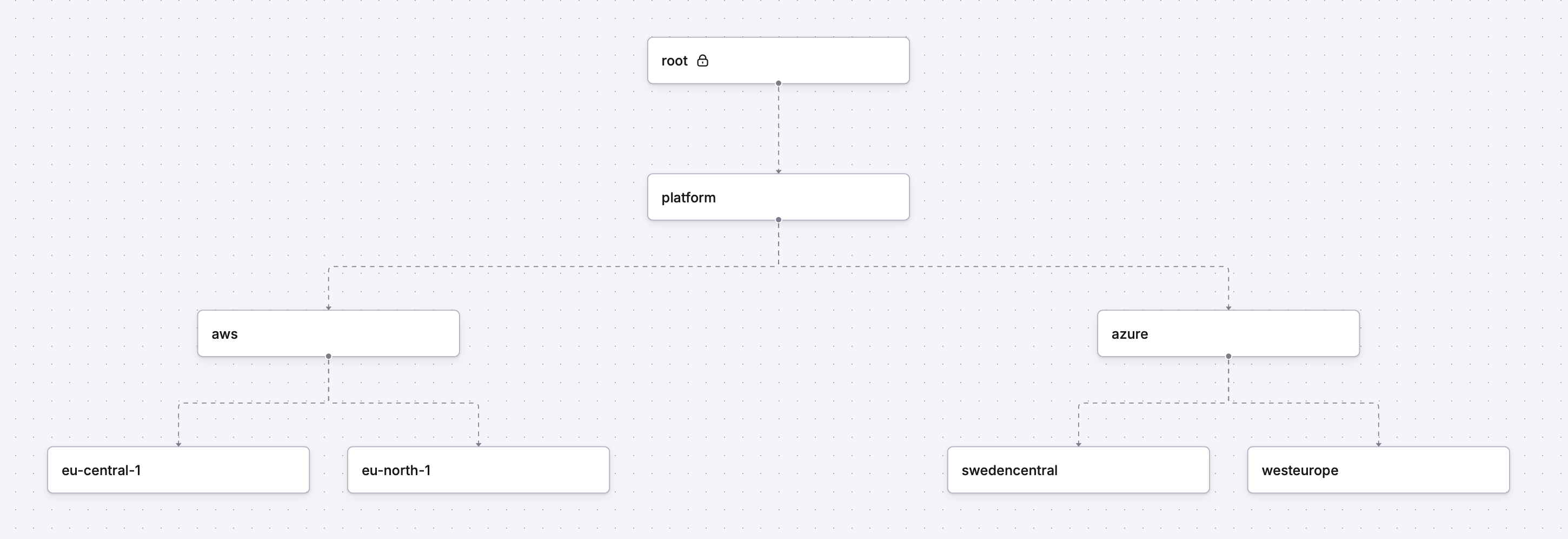
In the above example you could create entities that are common for all Azure stacks in the azure space, and these will be available to all spaces below it where inherit_entities = true. Each child-space can configure their own entities that are inherited to their child-spaces, and so on.
A really differentiating feature with spaces is that you can have multiple spaces with the same name. There is no arbitrary limitation that require unique space names. So this is allowed:
resource "spacelift_space" "first" {
  name            = "spacelift"
  parent_space_id = "root"
}

resource "spacelift_space" "second" {
  name            = "spacelift"
  parent_space_id = "root"
}
The corresponding experience for projects on HCP Terraform is (unfortunately) this:
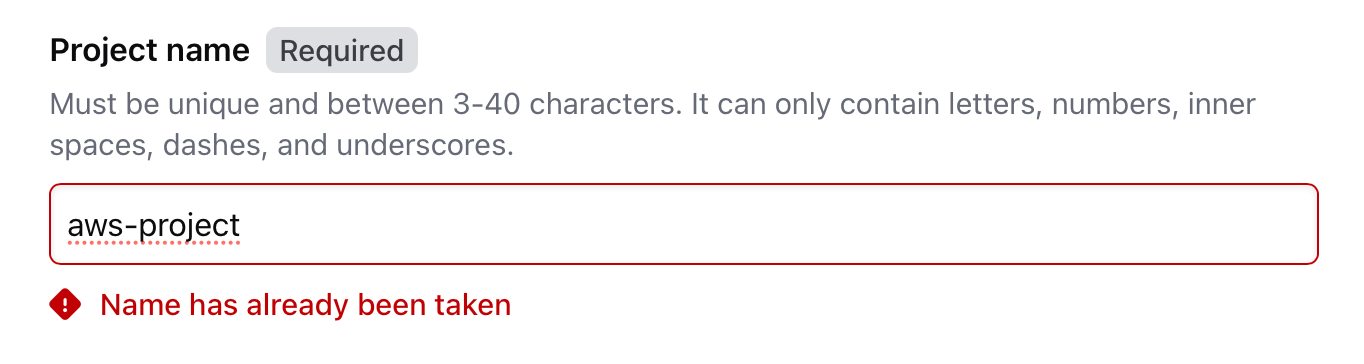
Does it make sense to have multiple spaces with the same name? Probably not high up in the space hierarchy, but we can easily imagine that farther down the hierarchy we have multiple different dev and prod spaces nested below different teams or different applications.
Stack role bindings#
You can assign roles to stacks, giving them privileges to perform administrative tasks allowed by these roles within Spacelift. In the example from before we could create a stack named azure-management within the platform space and assign it the space admin role on the Azure space:
resource "spacelift_space" "platform" {
  name            = "platform"
  parent_space_id = "root"
}

resource "spacelift_space" "azure" {
  name             = "azure"
  parent_space_id  = spacelift_space.platform.id
  inherit_entities = false
}

# create a stack in the platform space
resource "spacelift_stack" "azure_management" {
  name        = "azure-management"
  space_id    = spacelift_space.platform.id
  # ... other arguments omitted ...
}

# reference the built-in role "space-admin"
data "spacelift_role" "space_admin" {
  slug = "space-admin"
}

resource "spacelift_role_attachment" "azure_space_admin" {
  # assign the space admin role ...
  role_id  = data.spacelift_role.space_admin.id

  # ... to the stack "azure-management" ...
  stack_id = spacelift_stack.azure_management.id

  # ... within the space named "azure"!
  space_id = spacelift_space.azure.id
}
Now the azure-management stack can be used to manage stacks, spaces, and more within the Azure space. It will automatically work with the Spacelift provider for Terraform/OpenTofu without requiring a token or other form of credential configured up-front.
You can also put together custom roles if none of the built-in roles suit your needs.
What I really like about stack role bindings is how you can delegate administration of a sub-tree in your space hierarchy. You can give teams full control of their own space and allow them to create their own sub-spaces to fit their needs.
The pattern to achieve something similar on HCP Terraform is:
- Create a team with no members.
- Assign the required permissions to the team.
- Create a team token.
- Configure a workspace with an environment variable named
TFE_TOKENwith the value of the team token.
You have to remember to rotate the team token before it expires. You also have to make sure to document which team token is configured in which workspace, otherwise it is difficult to figure it out without performing some action and digging through the audit logs.
State management#
My default opinion on state management is: if I can outsource it, I will outsource it. Because state management is often not that exciting. Terraform/OpenTofu requires state management, so you can’t get away from it. But to be fair it is not a difficult or an interesting task.
On HCP Terraform you do not have a choice, state will be managed by the platform even if you try to manage it yourself by adding a backend block to your configuration. This was a real surprise to me when I first discovered it. I assumed I would be in control of where my state file is stored.
On Spacelift Deploy you can use the default behavior of letting the platform manage the state file for you. However, you have the option to use your own state backend. Set the manage_state argument to false to manage state in your own state backend:
resource "spacelift_stack" "azure" {
  name         = "my-azure-stack"
  space_id     = spacelift_space.azure.id

  # ... other arguments omitted ...

  manage_state = false
}
This is a differentiating feature because not being in control of where your state is stored (e.g. geographically) could be the difference between adopting a platform or looking for an alternative.
A small disclaimer: I am not using Spacelift Deploy in production. This means I have not experienced the full platform yet, nor have I encountered any obstacles that production workloads might encounter. For now the features covered in this post have been the greatest highlights of Spacelift Deploy for me. I might do more of these blog posts highlighting the small differentiating features that I find.